Showing posts with label applications. Show all posts

Wordgrinder -- Word Processor for the Linux Console

One of the few things I miss from the years when I used MS-DOS is WordPerfect 5.1. It was a perfect application for writing and few WYSIWYG word processors if any have been as userfriendly as WP was. For the last seven or eight years I've been constantly looking for a perfect word processor. I have used KWord, Abiword, OpenOffice, LyX and even Emacs for writing. Sometimes, I have planned to install a copy of WordPerfect under FreeDOS just to recreate the simple desktop with no distractions like Firefox. But there were, of course, things like Tetris and Civilization that sometimes kept me from writing for days.


Today I decided to test yet another Linux word processor -- WordGrinder is probably the one and only console mode word processor that exists for Linux. It is as simple as it gets, but not too simple. WordGrinder uses a binary format for its files, which makes them unreadable for ordinary text editors. It can, however, export the files to plain text and html. The latest version (0.3) should even export the text to LaTeX and troff for the geekiest users. Unfortunately, my Debian still has the version 0.2 that does not support all of the fancy stuff mentioned in the web site for WordGrinder.

Alpine is a great text mode email application

I have used pine as my main email application since 1993 and I'm not even considering to replace pine with a more modern email application as long as pine is available in the Unix system where I read my email. When I need to read email that has been sent to some of my private email accounts
(like the one I use for this blog) I most often use alpine installed on my Linux box.

Alpine is a rewrite of the original pine. Unlike pine it uses an Apache license that allows redistribution of modified versions of the application which makes it more acceptable for free software enthusiasts.


Alpine uses a simple menu interface for composing and viewing email messges. For writing a mail, it uses the extremely newbie friendly editor pico that can of course be used also as a standalone editor for editing any text files you might like to edit. From the main menu of Alpine one can enter the simple to use setup dialogues, where one can set many options including the signature, printer, non-default address books, rules for automativally filtering the messages in different folders, set the screen colors, and a lot more.

Most probably you receive your email not directly in your box but instead use a mail account provided by your ISP or for example Google. In fact, it is quite simple to configure Alpine to read and send email using a Gmail account like I have done for reading the lwlinux account I use for receiving mail about this blog.

If you want to use Alpine with Gmail, go first to the setup menu. Then select Config. In the next screenshot you will see how the settings for Gmail are done, only a few lines must be configured.


If you have never used a text mode email application you should at least give alpine a chance. It is easy to use and configure and a lot easier to use than most of the graphical email applications. You will soon realize how easy it is to read and write emails when you don't have to move your hand all the time between the keyboard and the mouse.

See also my previous articles about text mode Linux applications:
Burn CDs and DVDs with cdw | Remind is a lightweight tool for reminders | Lightest WWW browsers for Linux | Manage your contacts with abook

Manage your contacts with abook

I'm constantly looking for applications that can comfortably be used even with an old computer. Some days ago, I posted an article about lightweight personal organizer OSMO. Now I have found something even more lightweight!

My new address book manager is abook. It is a simple text mode organizer for storing contact information. It has a simple to use user interface (using ncurses) and does not force the users to remember obscure CTRL sequences or vi-like keyboard shortcuts. On the contrary, the keyboard shortcuts are few and they can be seen on the top of the screen.

Abook utilizes a simple card view for the contacts. The contact information is divided on five tabs where address, phone, other information and custom information have been dedicated a tab. Abook can be used as a standalone application or it can be used as the addressbook for mutt email application.


It is possible to import and export contact information using the command line option --convert. Abook can convert the the contact information from the following formats:
  • ldif
  • mutt
  • pine
  • csv
  • palmcsv

The following output formats are supported:
  • abook
  • ldif
  • mutt
  • html
  • pine
  • gcrd
  • csv
  • palmcsv
  • elm
  • text
  • spruce
  • wl
All the contacts are of course stored in a plain text file (default: ~/.abook/addressbook) that has an easy to understand format.

Manage your files with mc (Midnight Commander)

Once upon a time, there was a operating system called MS-DOS. It was a pretty limited system and awkard to use, but at the same time, it was a lot more useful than the graphical systems built on the DOS. To help the users, many companies created proprietary software that was sold to the end-users.

One of the most popular applications was Norton Commander or simply nc. The first version 1.0 was released as early as in 1986 [1]. This application set the standards for file managers for a long time. In fact, many file managers even today follow the concept of showing files simultaneously in two panels.

In addition to GUI file managers, the command line junkies can use the Midnight Commander, mc. It is available for probably every possible distribution in use. If you like to use Linux on an old computer, you might well try this application that does not steal all the resources of your old computer.


Midnight Commander provides all the usual functionality one expects from a file manager. With it, it is possible to copy, delete, archive, view and edit files or, for example, view man pages, It might not handle everything konqueror handles, but it does well what it is intended to do.

See also: Burn CDs and DVDs with cdw | Remind is a lightweight tool for reminders | Lightest WWW browsers for Linux

Burn CDs and DVDs with cdw

There are several useful applications available for burning CDs and DVDs on a Linux system. The geekiest users are probably happy with command line tools while most users are happy with k3b or gnomebaker.

Cdw is a ncurses based alternative to more famous tools. As a ncurses application it can be used on system with no X installed but as it has a menu based user interface it might be easier to use than the command line tools. In fact, cdw is just a frontend for cdrecord/wodim (for blanking CD-RW discs, writing data to single- or multi-session CD disc and single-session DVD discs) and mkisofs/genisoimage (for creating ISO images from selected files).


If you -- like me -- have difficulties in remembering the options of different CLI tools, you might like to try this small application. It is available at least in the repositories of Ubuntu and Debian testing (but not yet in the stable release).

If it is not included in your distribution's repositories, you can always get the source from the Sourceforge.

See also previous articles on text mode applications!

Abiword is a lightweight word processor

The choice of a lightweight distribution is not enough to ensure that a system can comfortably be run on an old computer. It is equally important to select lightweight applications that do not demand too much from the limited hardware. For example, OpenOffice.org is a great office suite but it can be too heavy for the old boxes with low memory.

I do most of my word processing with other applications. Sometimes I just use Emacs for simple text documents or LyX if I want to have a nice and well balanced printout that is typeset with LaTeX. But usually when I have to write a paper for the school I use Abiword.


Abiword does a reasonable job in importing from and exporting to RTF and DOC. It is not perfect but usually good enough for my simple text documents that don't have any graphics. If I need to edit documents that include graphics I usually edit the documents with OpenOffice and finish them using MS Word at school where I can ensure that the document is formatted using the official template of the school.

I like also the good selection of import and export plugins available for Abiword. There are plugins for all kinds of applications ranging from nroff and LaTeX to WordPerfect. The plugins are not perfect but usually good enough.

Abiword has been localized in many languages. Try Abiword, it might well be good enough for you.

Light-monitor provides lightweight system monitoring

This is probably the first time that I recommend an application I have installed from the source code. Light-monitor is a lightweight system monitor that is very suitable for those who use Linux with an old computer. It is light on the system resources and depends only on X and Xft.

The Light-monitor was extremely easy to compile with Vector Linux. I just downloaded the .tgz package, untarred it (tar xvf light-monitor-v1.7.tgz), and compiled with make and make install. Of course, you need to have gcc installed on your system to compile the C source.


Light-monitor can be seen in the bottom of the screen. On the right side, the OS X -like dock is wbar.

How to find Linux applications

Not only newbies have often difficulties in finding the right application for a certain task. I usually browse in several different software catalogues to find some interesting application for something I need to get done.

Here are my favourite Linux software catalogues:
After I find something of interest, I install the software using the package management of the distribution. I compile the software only when there is no package available for the distro I happen to be using. If you are using one of the more popular distributions, there should be no need to compile anything from sources.

A good rule to remember is: if you don't know how to compile some application from sources, you probably should not even try to compile it.

Dillo 2.0 released!

Dillo is one of the lightest web browsers and especially useful if you have to - or want to - use Linux with an old computer. For some time, it seemed like the project was forgotten or at least there seemed to be no progress in the form of new releases. Quite surprisingly, I noticed that new Dillo 2.0 is available in the download section of the project.


As there was no package available for Vector Linux or Slackware, I first installed fltk2 after which installing Dillo from the source code presented no problems. The magical words ./configure, make, su, make install were needed for compiling and installing the browser.


Dillo is not the fanciest web browser available but it is really lightweight and good enough for simple web pages. I'm looking forward to the next release!

Customize Conky

Lifehacker has published a nice tutorial on customizing conky, see Customize Conky for Ambient Linux Productivity. Another tutorial for Ubuntu users can be found in Quick Tweaks Gmail+Weather+Beauty right on your Ubuntu desktop. It should, however, be easy to use the tweaks on any other distribution.

My earlier post on conky: Conky is a lightweight system monitor for Linux.

Remind is a lightweight tool for reminders

I like to use lightweight tools whenever possible as there is no point in running IceWM if one uses KDE or GNOME applications for everyday tasks. Because my memory is far from perfect, I like my computer to remind me about the projects I have to work on and about classes I have to attend.

There are some obvious choices for this kind of task if one uses KDE or GNOME. For exapmle, Korganizer would be great tool for keeping your calendar and to do lists. I decided to use a command line tool, remind, for storing all the information about my meetings, classes, and deadlines.

Remind uses a plain text file for storing information. The syntax for ordinary reminders is pretty simple and evident, as you can see from a few lines of my .reminders:

REM 22 September AT 16:00 YLY Mercatori
REM Tue AT 08:30 YLY/MENY1
REM Tue AT 11:15 TKMY1_ls17
REM Tue AT 14:15 RuIb1

These are reminders for a meeting on the 22nd of September at 16:00 and three reminders for my classes on tuesdays. It is possible to use much more sophisticated reminders that have rules for deciding the date of some action. You can also set the remind to warn you in advance, before the actual date of the reminder, but I like to keep my reminders simple.

I like to use remind for printing a schedule for the next week every sunday. As I have stored my reminders in the file .reminders this can be done easily with a simple command: rem -c+1


If a weekly calendar is not enough for you, you might consider printing out a PostScript calendar of your reminders for the next twelve months with remind -p12 .reminders |rem2ps >remind.ps.


There are many good sites about using remind in an efficient way. Let your computer remind you of your meetings, classes and deadlines. It will help you to get things done!

[1] Manage your time with Remind
[2] Remind: The Ultimate Personal Calendar
[3] 43 Folders' wiki

Conky is a lightweight system monitor for Linux

Many Linux users want to have an application monitoring the system usage on their desktop. Conky is a solution that is suitable for lightweight Linux installations on old computers.

Latest version of Conky was released last week, but most probably the older version available from the package repositories of your favourite distribution will work just fine.

In the official home page for Conky, you find nice screenshots of the application with respective configuration files. They are certainly worth having a look if you want to have a lightweight system monitor on your desktop.

Elsewhere: 18 CLI Audio Tools


My regular readers have certainly noticed that I like to use command line tools even when using a system with X Windows installed. In an earlier post, I have already mentioned mp3blaster, my favourite music player. Now I have learned about many more command line audio tools.

18 CLI Audio Tools for Linux presents a nice collection of command line audio tools for Linux. I have used some of them and I will certainly use a few more of them in the future. I'm sure you will find something new there, too.

Who needs Amarok or Rhytmbox for playing mp3 or ogg vorbis files? I dont.

Lightest WWW Browsers for Linux

If you have to - or if you want to - use a lightweight web browser you have to be ready to live without support for Java, Flash, and even cascading style sheets. Your old computer did not support Java or Flash a decade ago, and you just cannot expect to have all the modernities if you are using a very old computer, let us say with less than 64 MB RAM. If you have more memory, consider using for example Opera.

There are several lightweight and minimalistic browsers available. Some of them can be used only in text mode.

Lynx
Lynx is one of them. Lynx was originally written for Unix and VMS, It is available for many platforms, including DOS, BeOS, MINIX, QNX, AmigaOS and OS/2. I use it daily when following links in the emails I receive, as I have configured my email client pine to use lynx as web browser.

w3m
w3m is another text mode browser. It has English and Japanese help files and it can be used in both languages. w3m can display tables and frames. In addition, it can be used in pipes as a pager, just like more or less are used.


links
Links is a text mode WWW browser with ncurses interface. It supports colors, tables and background dowloads. Frames are supported as well. It is configured by menus.

Links can be used not only in text mode, but also in graphical mode by starting it with option -g. It might be good enough for simple graphical pages.


elinks
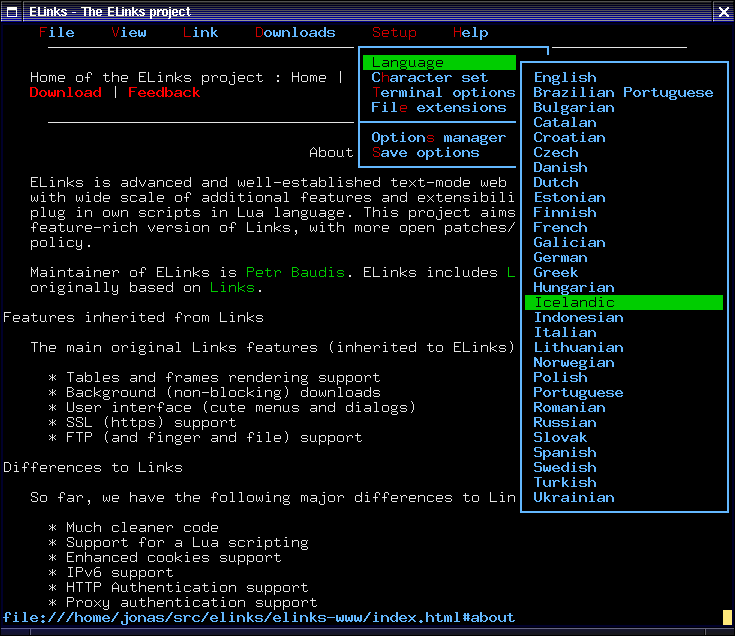
Elinks is based on links. It is a text mode WWW browser, supporting colors, table rendering, background downloading, menu driven configuration interface and tabbed browsing.

The official home page for elinks has more screenshots!

Dillo
Last but not least: Dillo. I suppose Dillo is the lightest graphical web browser. It is pretty simple and unfortunately its development has been frozen. Enclosed screenshot is borrowed from Dillo's home page, as Dillo has already been left out from openSUSE's repositories.

Looking for CLI apps?

In many cases, it is not easy to find the best application for certain task just. Often, you end up installing and uninstalling several candidates before finally deciding on the application to use on a regular basis, probably for an extended period of time.

CLI-Apps.org is a portal for finding command line applications for Linux. The applications are tagged by type of application and rated by users that makes it a lot easier to find interesting command line applications.

Unfortunately, the site misses many interesting CLI apps. In the group Editors, for example, only Emacs, VIM and Nano are mentioned. Many editors, like Joe, Jed and Qedit, are left out. Many more applications can be found in Free Software Foundation's (FSF) Free Software Directory.

Music in the terminal

I like to have some background music when I am not doing anything demanding complete concentration. I practically never use Rhytmbox or Amarok for playing music, as there are some simple text mode applications that fully answer to my needs.

At the moment, my favourite music player is mp3blaster. It uses a nice ncurses interface and is simple enough to use.

Free Image Hosting at www.ImageShack.us


Most probably mp3blaster can be installed from the package repositories of the distribution you use.