My favourite command line tool is certainly wget and I use it all the time to download ISO images of different distributions. The many command line options make wget very versatile. You can for example limit the download rate and let wget recursively follow the links in downloaded html code. In addition, wget can continue interrupted downloads.
This, for example, limits the download rate to 100kB/s when loading the new beta release of Zenwalk 5.2 with GNOME:
wget --limit-rate=100k http://pnboy.pinguix.com/gapan/zengnome/zenwalk-gnome-5.2beta.iso
So you can still continue using your broadband for internet surfing without the download noticeably slowing down your connection.
Wget is included in every major distribution. If it is not included in the default installation, you should install it using your favourite package management tool.
Gina Trapani has written a nice overview of wget. Read her Geek to Live: Mastering Wget. I read it and got some new ideas.
News: ZevenOS RC1 released
More information can be found in the official home page for ZevenOS (in German). The developers of ZevenOS want to build a distribution "with a certain BeOS touch", including speed and compatibility with old hardware. ZevenOS is based on Ubuntu.
ZevenOS does not demand latest hardware: only a Pentium 200 with 128 MB RAM (for installation, 196 MB) are needed. Minimum hard disk space is 2 GB, though 4 GB is recommended. For graphics, a video card with 16 MB is needed. In addition, your brains are listed among the system requirements :-)
ZevenOS uses IceWM as its window manager. In addition, the developers have chosen lightweight software that should run well on old computers. Thus, Abiword and Gnumeric are the chosen office packages instead of OpenOffice.Org.
Release Candidate 1 was released a few days ago. You can download it here.

Elsewhere: X Window Managers
20 Most Nimble and Simple X Window Managers for Linux is a short review of 20 window managers available for Linux. See also Window Managers for X.
Jukebox with P133 and 42 MB RAM
You might get some new ideas for using old hardware by reading the blog posting The Garage Jukebox in the blog Classical Gas Emissions. The author describes here how he built a digital jukebox with P133, 42 MB RAM, four DVD drives, and Damn Small Linux.
Nice Hack!
Nice Hack!
News: Houswives buy Laptops with Linux
According to an article published in zdnet, housewives in Taiwan buy Asus' laptops with Linux while geeks buy them with XP. Makes me wonder, why geeks in Taiwan want to pay for XP when they could get a better OS preinstalled?
Lightest WWW Browsers for Linux
If you have to - or if you want to - use a lightweight web browser you have to be ready to live without support for Java, Flash, and even cascading style sheets. Your old computer did not support Java or Flash a decade ago, and you just cannot expect to have all the modernities if you are using a very old computer, let us say with less than 64 MB RAM. If you have more memory, consider using for example Opera.
There are several lightweight and minimalistic browsers available. Some of them can be used only in text mode.
Lynx
 Lynx is one of them. Lynx was originally written for Unix and VMS, It is available for many platforms, including DOS, BeOS, MINIX, QNX, AmigaOS and OS/2. I use it daily when following links in the emails I receive, as I have configured my email client pine to use lynx as web browser.
w3m
w3m is another text mode browser. It has English and Japanese help files and it can be used in both languages. w3m can display tables and frames. In addition, it can be used in pipes as a pager, just like more or less are used.

links
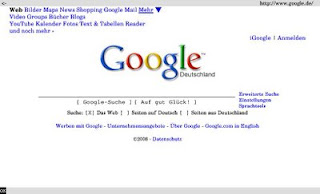 Links is a text mode WWW browser with ncurses interface. It supports colors, tables and background dowloads. Frames are supported as well. It is configured by menus.
Links can be used not only in text mode, but also in graphical mode by starting it with option -g. It might be good enough for simple graphical pages.
 elinks
Elinks is based on links. It is a text mode WWW browser, supporting colors, table rendering, background downloading, menu driven configuration interface and tabbed browsing.
The official home page for elinks has more screenshots!
Dillo
 Last but not least: Dillo. I suppose Dillo is the lightest graphical web browser. It is pretty simple and unfortunately its development has been frozen. Enclosed screenshot is borrowed from Dillo's home page, as Dillo has already been left out from openSUSE's repositories.
There are several lightweight and minimalistic browsers available. Some of them can be used only in text mode.
Lynx
 Lynx is one of them. Lynx was originally written for Unix and VMS, It is available for many platforms, including DOS, BeOS, MINIX, QNX, AmigaOS and OS/2. I use it daily when following links in the emails I receive, as I have configured my email client pine to use lynx as web browser.
w3m
w3m is another text mode browser. It has English and Japanese help files and it can be used in both languages. w3m can display tables and frames. In addition, it can be used in pipes as a pager, just like more or less are used.

links

Links can be used not only in text mode, but also in graphical mode by starting it with option -g. It might be good enough for simple graphical pages.
 elinks
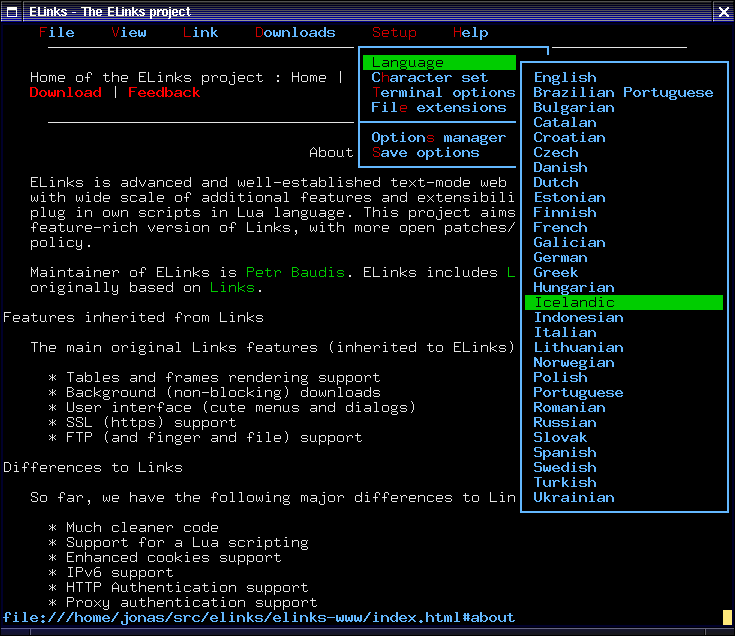
Elinks is based on links. It is a text mode WWW browser, supporting colors, table rendering, background downloading, menu driven configuration interface and tabbed browsing.
The official home page for elinks has more screenshots!
Dillo

Lightweight window managers: Equinox

Equinox Desktop Environment (EDE) is yet another lightweight window manager. It looks vaguely familiar to me... looks almost like something I used in the late 90's!
Unlike most lightweight window managers, EDE supports desktop icons, wallpapers, themes and has a panel with taskbar.
Unfortunately the project does not offer any ready deb's or rpm's, and neither of the distributions I currently use (Debian, openSUSE) do not have EDE in their repositories. It seems users are expected to compile their own EDE from the sources offered by sourceforge.
Links:
[1] Equinox Desktop Environment
[2] Linux.com: Lightweight Equinox Desktop Environment needs polish
Subscribe to:
Posts (Atom)